
Social media has made it easier than ever to stay connected. We use platforms such as Instagram, Facebook, YouTube, WhatsApp, and X to talk to friends, share photos, watch videos, follow creators, discover products, and keep up with things happening around us.
But there is another side to being active online.
Your social media profile can contain a surprising amount of personal information. A few public posts may reveal your name, interests, workplace, school, friends, locations, or even details about your daily routine. If your account is compromised, someone may also use it to contact people you know or send messages in your name.
The good news is that staying safer on social media does not require advanced technical knowledge.
Simple habits such as using a unique password, enabling two-factor authentication, reviewing privacy settings, and checking suspicious messages can make a meaningful difference.
This guide covers 15 practical social media safety tips that are easy to follow. It also explains what to do if something goes wrong and how to recognize common warning signs before they become a bigger problem.
Why Social Media Safety Matters
Social media accounts are often connected to other parts of our digital lives.
For example, your account may be connected to an email address or phone number and may contain years of photos, conversations, contacts, and personal information. Some accounts may also be used to sign in to other services.
That is why losing access to a social media account can be more than just an inconvenience.
There is no way to remove every risk from the internet, but you can make your accounts harder to misuse by following a few basic security practices.
The key is consistency. You do not need to change everything in one day. Start with the most important protections and build good habits over time.
1. Use a Strong and Unique Password
Your password is one of the basic barriers between your account and someone trying to access it.
A common mistake is using the same password on several websites. It may be convenient, but it also creates a problem: if that password is exposed on one service, someone may try it on your other accounts.
Avoid passwords based on information that is easy to guess, such as:
- Your name
- Birthday
- Phone number
- Pet’s name
- Simple number sequences
- Common words
- Information visible on your social profile
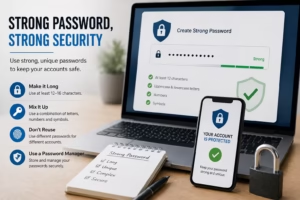
Instead, use a long, unique password that you do not use anywhere else.
If remembering different passwords is difficult, a reputable password manager can help create and store unique passwords for your accounts.
A simple rule to remember
Your social media password should be:
Unique + difficult to guess + not shared with anyone
You should also avoid saving passwords in notes, screenshots, or messages where other people could easily access them.
2. Turn On Two-Factor Authentication
Two-factor authentication, commonly called 2FA, adds another layer of protection to an account.
Without 2FA, a person who obtains your password may be able to sign in. With 2FA enabled, the service can require an additional verification step.
Depending on the platform, this may involve:
- An authentication app
- A security key
- A verification code
- Another supported verification method
The exact options vary between services.
2FA does not make an account completely immune to attacks, but it can provide useful additional protection if your password is compromised.
Where should you enable it first?
Start with accounts that are especially important to you:
- Your primary email account
- Banking or financial accounts
- Social media accounts
- Cloud storage
- Other accounts containing sensitive information
If a service supports multiple 2FA methods, choose one that you can use reliably.
Keep Recovery Information Safe
Some services provide backup or recovery codes when you enable 2FA.
These codes are important because they may help you regain access if you lose your usual verification method.
Do not post recovery codes online or send them to another person. Store them somewhere secure.
3. Review Your Privacy Settings
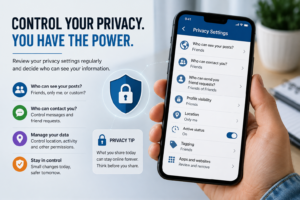
Privacy settings determine how much information you share and who can interact with your account.
When you create a new account, it is tempting to accept the default settings and move on. However, it is worth spending a few minutes reviewing them.
Depending on the platform, you may be able to control:
- Who can see your posts
- Who can message you
- Who can tag or mention you
- Who can comment on your content
- Whether your activity status is visible
- What profile information is publicly available
- How your content can be shared
There is no single privacy setting that is right for everyone.
For example, a creator or business may intentionally keep a profile public, while someone using social media mainly for friends and family may prefer more restrictive settings.
The important thing is to make the choice yourself rather than sharing more information simply because it is the default.
Review settings regularly
Social platforms change features and settings over time.
Make it a habit to review your privacy options occasionally, especially after a major account or app update.
4. Think Before Clicking Unknown Links
Suspicious links are one of the most common ways people are tricked online.
You may receive a message saying that:
- You have won a prize
- Your account is about to be suspended
- Someone reported your profile
- You need to verify your account
- You have received a payment
- You have been selected for an exclusive offer
Some legitimate services also send notifications, which is why the message alone should not be your only reason for trusting a link.
Pay attention to urgency.
If someone is pressuring you to click immediately or threatening that something bad will happen unless you act within a few minutes, take a step back.
A safer approach
Instead of opening the link from the message, open the official app or type the known website address yourself.
For example, if you receive a message claiming there is a problem with your social media account, check the account directly through the official app rather than following an unexpected link.
5. Avoid Sharing Too Much Personal Information
Social media encourages people to share details about their lives, but not every detail needs to be public.
Be particularly careful with information such as:
- Home address
- Personal phone number
- Financial details
- Identity documents
- Passwords
- Recovery codes
- OTPs
- Private family information
- Detailed travel plans
Even information that seems harmless can sometimes be combined with other publicly available details.
For example, posting your workplace, regular travel route, and exact daily schedule may reveal more about your routine than you intended.
This does not mean you need to stop sharing everyday moments. Simply consider who can see the information and whether it needs to be public.
Be careful with location sharing
Real-time location posts can reveal where you currently are.
If you are visiting a place, you may prefer to share the experience later rather than announcing your exact location while you are still there.
The right choice depends on your circumstances, but being aware of what a post reveals is a useful habit.
6. Learn to Recognize Fake Profiles
Fake profiles are not always easy to identify.
Someone may copy another person’s name and profile picture or create an account that appears to represent a company, creator, or public figure.
Be cautious when an unfamiliar account:
- Has very little history
- Uses a suspicious profile photo
- Sends messages immediately after following you
- Requests money
- Asks for personal information
- Sends unexpected links
- Makes unusual promises
- Claims to represent an organization without clear evidence
A profile looking professional does not automatically make it genuine.
If someone you know suddenly contacts you with an unusual request, verify it through another channel.
For example, if a friend sends you a message asking for money and the request seems unusual, call them directly before doing anything.
7. Never Share OTPs or Verification Codes
One-time passwords and verification codes should be treated as private information.
A scammer may pretend to be from a company, bank, delivery service, or social media platform and ask you to provide a code that was sent to your phone or email.
Do not share it.
If someone asks for a verification code, stop and verify the request through the organization’s official app or website.
This is particularly important when the message creates pressure or fear.
Remember
An OTP is for verification, not for sharing.
The same principle applies to password-reset codes, recovery codes, and other account-security codes.
8. Check Your Login Activity
Many major online platforms provide security tools that show recent login activity or devices associated with your account.
The exact location of this feature varies by platform, but it is worth checking occasionally.
Look for activity that you genuinely do not recognize, such as:
- An unfamiliar device
- An old phone you no longer use
- A login at an unexpected time
- A session you forgot to sign out from
If you see something suspicious, use the platform’s official security options.
Depending on the service, you may be able to sign out of unfamiliar sessions, change your password, and review your account recovery details.
Don’t rely only on the displayed location
Login locations are not always exact. They may be based on network information rather than your precise physical location.
An unfamiliar city does not automatically mean someone has hacked your account.
Consider the device, timing, and other details together.
9. Review Connected Apps and Websites
Over time, you may connect your social media account to different apps and websites.
For example, you might connect an account to a photo-editing service, game, quiz, or another online tool.
Some of these connections may remain active long after you stop using the service.
Check your account’s connected apps or third-party access section from time to time.
If you find a service you no longer use, consider removing its access.
This does not mean every third-party connection is dangerous. It simply means you should know what has access to your account and remove connections that are no longer necessary.
10. Keep Your Phone and Apps Updated
Updates are not only about adding new features.
They can also contain bug fixes, security improvements, performance changes, and compatibility updates.
Keep your social media apps reasonably up to date through trusted app stores. Your phone’s operating system should also receive available security updates when appropriate.
An outdated application may sometimes develop compatibility or security problems, particularly as the operating system around it changes.
If your phone has limited storage or mobile data, you can review update settings and choose a suitable approach rather than ignoring important updates indefinitely.
11. Be Careful on Public Wi-Fi
Public Wi-Fi can be useful when you are at a hotel, airport, cafe, library, or another public place.
However, you should not automatically trust every network you see.
Some networks may be poorly configured, and it can sometimes be difficult to know who operates an unfamiliar network.
When using public Wi-Fi:
- Avoid sensitive activities on networks you do not trust
- Keep your device and apps updated
- Turn off automatic connection to unfamiliar networks
- Use secure websites and services
- Disconnect from networks when you no longer need them
If you need to perform an important account or financial task, using a trusted network is generally a better choice.
12. Learn How Common Social Media Scams Work
Scammers regularly change their stories, but many scams use similar techniques.
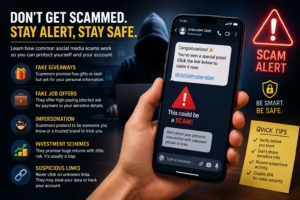
The message may create excitement, fear, urgency, or curiosity to encourage you to act without thinking.
Here are a few common examples.
Fake giveaways
You are told that you won a prize but must pay a fee or provide information before receiving it.
Fake job offers
Someone promises an easy online job and then asks for money, personal information, or documents.
Impersonation
A scammer pretends to be a friend, company employee, creator, or another trusted person.
Investment promises
Someone may promise guaranteed profits or unusually high returns with little or no risk.
Fake account warnings
A message claims that your account will be deleted or restricted unless you click a link or provide information.
The best defense is to slow down.
If money, passwords, OTPs, or sensitive information are involved, verify the request through an official channel before taking action.
13. Be Selective About Friend and Follow Requests
You do not have to accept every request you receive.
If you do not recognize an account, take a moment to look at its profile before accepting.
Consider:
- Do I know this person?
- Does the account have normal activity?
- Does the profile look genuine?
- Why is this person trying to connect with me?
- Have they already started asking for something?
A large follower count does not prove that an account is trustworthy.
Likewise, a profile photo is not enough to verify someone’s identity.
If an account appears suspicious, you can ignore the request or use the platform’s available block, restrict, or report features.
14. Protect Your Email Account
Your email account deserves special attention because it may be connected to your social media accounts and other online services.
If someone gains access to your email, they may potentially use account recovery options for other services.
For that reason, protect your primary email account with:
- A strong and unique password
- Two-factor authentication
- Up-to-date recovery information
- Regular security checks
If you receive an unexpected password-reset notification, do not panic.
Instead, open the relevant service directly and check your account from there.
Avoid clicking a password-reset link in an unexpected message unless you have verified that it is genuine.
15. Know What to Do If Your Account Is Hacked
Even careful users can sometimes lose access to an account.
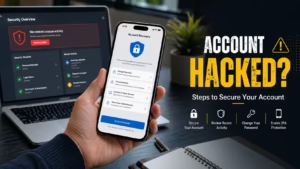
If you believe your account has been compromised, act as soon as possible.
Step 1: Use the official recovery process
Go directly to the platform’s official website or application and look for its account recovery or security options.
Avoid relying on random people who claim they can recover your account for a fee.
Step 2: Change your password
If you still have access, change the password immediately.
Make sure the new password is unique and has not been used on another website.
Step 3: Review active sessions
Check the devices and sessions connected to the account and sign out of anything you do not recognize, if the platform provides that option.
Step 4: Enable two-factor authentication
Once you regain control, enable 2FA if it is available.
Step 5: Check your account details
Look for changes to:
- Email address
- Phone number
- Username
- Recovery information
- Privacy settings
Step 6: Warn your contacts
If suspicious messages were sent from your account, let your friends or followers know.
This can prevent them from trusting a scam message that appears to come from you.
What Should You Avoid Sharing on Social Media?
There is no universal list of information that everyone must keep private. Your needs depend on how you use social media.
However, some information deserves extra caution.
Avoid publicly sharing:
- Passwords
- OTPs
- Banking PINs
- Recovery codes
- Sensitive financial information
- Identity documents
- Private account details
- Your exact home address
Also check the background of photos before posting them.
A picture can accidentally show a document, address, computer screen, travel ticket, phone number, or another piece of information that you did not intend to publish.
Taking five seconds to check the image can sometimes prevent an unnecessary privacy problem.
How to Handle a Suspicious Social Media Message
When a message feels unusual, do not respond immediately.
Use a simple Stop, Check, Verify approach.
Stop
Do not click links, download files, or send information.
Check
Look at the sender, message wording, account history, and request.
Verify
If the message claims to be from a company or service, open its official app or website yourself.
Decide
If the request cannot be verified, do not continue.
Report
If it appears to be a scam, impersonation attempt, or abusive message, use the platform’s reporting tools.
The most important part is not allowing urgency to make the decision for you.
Social Media Safety for Teenagers and Young Users
Young users can face many of the same online risks as adults, along with additional challenges related to privacy, unwanted contact, cyberbullying, and pressure to share personal content.
Parents and guardians can encourage young users to:
- Keep sensitive information private
- Use strong passwords
- Enable appropriate account security features
- Avoid sharing their exact location publicly
- Be cautious when communicating with strangers
- Report harassment or threatening behavior
- Talk to a trusted adult when something feels wrong
It is also useful to explain that online identities are not always easy to verify.
A person may present themselves differently online, and a profile photo, follower count, or convincing biography does not necessarily prove who someone really is.
A Simple Social Media Safety Checklist
You do not need to become an expert in cybersecurity to improve your online safety.
Start with these basic checks:
Password: Is it strong and unique?
2FA: Is two-factor authentication enabled?
Privacy: Do you know who can see your posts and personal information?
Links: Do you avoid clicking unexpected links?
Personal information: Are you careful about what you share publicly?
Login activity: Have you checked your connected devices recently?
Third-party access: Are there apps connected to your account that you no longer use?
Updates: Are your phone and important apps reasonably up to date?
Scams: Do you verify unexpected requests involving money or account information?
Recovery: Is your recovery email or phone number still correct?
If you can answer “yes” to most of these questions, you are already taking several useful steps toward better account security.
Frequently Asked Questions
Is social media completely safe?
No online service is completely risk-free. However, good security practices can reduce many common risks. Strong passwords, two-factor authentication, privacy controls, and careful handling of messages can all help.
Should I make my social media account private?
It depends on how you use the platform. A private account can give you more control over who sees your content, while creators and businesses may intentionally keep their profiles public. Review the platform’s privacy options and choose settings that suit your needs.
Can someone access my account if they know my username?
Knowing your username alone does not normally give someone access to your account. However, usernames can be used in phishing attempts or other scams. A unique password and 2FA provide additional protection.
Should I accept friend requests from people I don’t know?
You are not required to accept them. If you do not recognize someone or have no reason to connect with them, it is reasonable to ignore the request.
What should I do if someone asks for my OTP?
Do not share it. Treat an OTP or verification code as private information. If you are unsure why a code was generated, check your account directly through the official service.
How often should I review my privacy settings?
There is no required schedule. Checking them every few months and after major changes to an account or platform is a sensible habit.
Is public Wi-Fi always dangerous?
No. Public Wi-Fi is not automatically dangerous, but you may have less control over an unfamiliar network. Be cautious with sensitive activities and avoid connecting automatically to unknown networks.
What should I do if I clicked a suspicious link?
Stop interacting with the page and do not enter additional information. If you entered a password, consider changing it through the service’s official website or app. If you downloaded a file or believe your device may be affected, follow the security guidance appropriate for your device.
Final Thoughts
Social media safety does not have to be complicated.
You do not need advanced technical knowledge or expensive security tools to improve the protection of your accounts. Start with the basics: use unique passwords, enable two-factor authentication, review privacy settings, keep your software updated, and be careful with unexpected messages and links.
It is equally important to think about what you share publicly. A photo, location, or small piece of personal information may reveal more than you intended, especially when combined with other information available online.
If something feels suspicious, slow down.
Scammers often rely on urgency, fear, excitement, or curiosity to make people act quickly. Taking a moment to verify a message through an official channel can prevent a simple mistake from becoming a bigger problem.
And if your account is ever compromised, do not panic. Use the platform’s official recovery process, secure the account, change your password, review connected devices, and warn your contacts if necessary.
There is no perfect way to eliminate every online risk. The goal is to make sensible decisions consistently.
A few good security habits can go a long way toward making your social media experience safer, more private, and more enjoyable.